Showing posts with label Google. Show all posts

Thursday, December 15, 2016

There Is Now A Device That Will Let You Taste The Food That You Google

It was only last month that two researchers from the National University of Singapore presented a smart little device at ACM User Interface Software and Technology Symposium in Tokyo. This little box was packed with a food revolution of its own - it was packed with a battery that powered electrodes that, in turn, could stimulate taste receptors.

This means, you can now taste that chocolate cake you've been secretly googling ;) 

Food Love

The device, a prototype at this stage, has a 9V battery plugged into a circuit stacked with four different elements that trigger temperature changes of 5°C when applied to the tip of the tongue. This change in temperature creates a sweet taste. The credit for the invention of this device goes to scientists Nimesha Ranasinghe and Ellen Yi-Luen Do from the National University of Singapore who fiddled with thermal stimulation, seeing food online is not so virtual a reality anymore.

The electrodes when placed on the jaw, stimulate jaw muscles that help us chew food. It was found that food felt tougher when high frequency pulses were triggered, and it, alternatively, felt more elastic in texture with longer pulses.

The idea behind its creation is pretty noble too - to help those with health conditions, even those on a diet.

"We believe this will be especially helpful for the people on restricted diets for example salt (hypertension and heart problems) and sugar (diabetics)," Dr Ranashinghe told MailOnline in an interview.

Wednesday, October 5, 2016

10 Secret Google Earth Places You Are Not Allowed To See


Google Earth

The most incredible innovation of the digital era is Google Maps and Google Earth. Both these innovations have made our life very easy. How hard our life would have been if these technologies were not there.

With Google Maps you can travel anywhere on the earth. It has become our own personal navigation system. And with the feature of downloading the map of any place and using it in offline mode has made our life very easy.  

Along with google maps, google earth gives us the ability to look at any place using satellite images. Google Earth lets you fly anywhere on Earth to view satellite imagery, maps, terrain, 3D buildings, from galaxies in outer space to the canyons of the ocean.

But with such innovations there also comes a risk to the security of any nation.  So as to preserve the privacy of any place google blurs or blackens out locations that are not allowed to be seen by general public. 

Here is the video that shows 10 such locations that we are not allowed to see.


Thursday, September 29, 2016

15 Google Map Images You Won't Believe Exists!!

Is Pakistan trying to troll India with 'Namak Haram Country' image on Google?

LAHORE: In a bizarre report by a Pakistani daily, Daily Pakistan, published on their website in which they claimed that when one searches for “Namak Haram Country” on Google, it shows India’s flag.


Stooping low in their act, the website says, “Like majority of Pakistanis, the US-based tech giant considers India as a “Namak Haram country’. ”
Reports suggest that Pakistan media is trying to troll India with the image of it, however, it could either be a glitch or work of Pakistani hackers playing with the Search engine optimization (SEO).
Namak Haraam’ is one of India’s most famous Hindi movies which stars Amitabh Bachchan and Rajesh Khanna in the leads.
The story is about a class war that divides two friends and considering it as a classic film in India, it still remains one of the finest movies of India.
So when, a person types the word country after the name of the movie, Google will show the flag and the map of the country where the movie was made.

Users on twitter shared the picture along with angry messages while many other had a laugh riot around it. Twitter users of Pakistan, on the other hand seemed really happy with this Google search result. Indian Twitter seemed to have their share of fun too.


;
source

Wednesday, September 28, 2016

Meet "YouTube Go": YouTube reimagined for the next generation of

Meet YouTube Go: a new YouTube app built from scratch to bring YouTube to the next generation of viewers. YouTube Go is designed with four concepts in mind. It’s relatable, with video recommendations and a user interface that is made for you. The app is designed to be offline first and work even when there’s low or no connectivity. It’s alsocost-effective, providing transparency and reducing data usage. And finally, it’s a socialexperience, connecting you with the people and content you care about.


The new preview function shows you what to expect before choosing to save or play the video, and in which resolution. You can also share videos to friends nearby, without using up any data.

Here are some of YouTube Go’s most notable features:
  • Find and discover relatable videos right on the home screen: YouTube Go homescreen features trending and popular videos in your area, so that you’ll find and fall in love with new videos that you and your community care about.
  • Preview videos before you save or watch: Not sure if you want to watch the video? On YouTube Go when you tap on a thumbnail, it’ll trigger a quick preview of the video, giving you a better sense of what the video is about before you decide to save or play it.
  • Choose your resolution when saving or streaming videos: Whether you’d like to save a video for offline viewing later, or stream it now, you can see and choose the amount of data you’d like to spend on that video.
  • Share videos with friends nearby: Share videos with friends and family nearby without using any data. You can send and receive videos instantly and offline with others using the YouTube Go app.
Google will gradually roll out YouTube Go to more and more people over the next few months, getting their feedback and improving the product before launching it widely early next year. If you'd like to be among the first to find out when the app is ready, you can sign up at youtubego.com/signup.

We’re thrilled to bring YouTube Go to India … ab Mazze udao, data nahin!

Tuesday, September 27, 2016

An 86 Year Old Gave Google Such A Unusual Request That Google Responded Her Personally

Have you ever used words like "please" and "thank you" in your google search inquiry?

The answer is obviously ‘no’ for majority of us.

So when WinnerHands came across such a story, we couldn’t stop ourselves from sharing.

A couple of months ago when Ben John opened his granny’s laptop and saw her recent google search history he couldn’t resist himself from taking a picture of the search and sharing it on twitter.

Here’s what he shared:-


Source


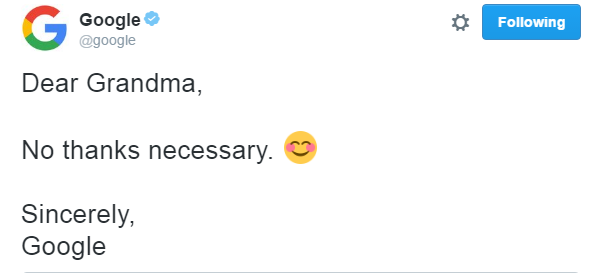
This was such a polite search request that google responded her personally. This is what Google’s response was:-


 Source


When Ben asked his grandma why she had written such a polite request to Google, it turns out that she was under the impression that there was a real person sitting somewhere at Google’s office responding to every search from the website’s visitors. And, of course, she thought that if she talked to him nicely, he would carry out her request much more quickly.

Ben John also shared a photo of himself and his famous grandmother:-


Sunday, September 25, 2016

Here's how Indians Responded After A Pakistani Guy Tried To Troll India!!

After the Uri attack, the lukewarm relationship between India and Pakistan suddenly turned grave. And at this point of time a Pakistani Twitter user tried to troll India by sharing a screenshot of his google search.

Here's what he shared:


Indian twitterati noticed this and were quick in giving similar response to @Ghazzuu. Here's what Indian twitter users shared:-


Wednesday, September 21, 2016

How big a threat is Google Allo to WhatsApp?

Whether it’s planning a night out or just catching up, we all rely on messaging to stay in touch with friends and loved ones. But too often we have to hit pause on our conversations — whether it’s to check the status of a flight or look up that new restaurant. So Google has created a messaging app that helps you keep your conversation going, by providing assistance when you need it.


Google has released Google Allo, on September 20, 2016 a new smart messaging app for Android and iOS that helps you say more and do more right in your chats. Google Allo can help you make plans, find information, and express yourself more easily in chat. And the more you use it, the more it improves over time.

Respond quickly with Smart Reply
Google Allo makes it easier for you to respond quickly and keep the conversation going, even when you’re on the go. With Smart Reply, you can respond to messages with just a tap, so you can send a quick “yup” in response to a friend asking “Are you on your way?” Smart Reply will also suggest responses for photos. If your friend sends you a photo of their pet, you might see like “aww cute!” And whether you’re a “haha” or “😂” kind of person, Smart Reply will improve over time and adjust to your style.

Express yourself with photos, emojis and stickers
Chat is more than just text, so Google created a rich canvas for you to express yourself in Google Allo. You can make emojis and text larger or smaller in size by simply dragging the “send” button up or down. Make photos your own by scribbling on them before you send. And we’ve worked with independent artists and studios around the world to create more than 25 custom sticker packs, because sometimes a “sloth riding a pizza” says it all.


Meet your personal Google Assistant
In Google Allo you’ll also be introduced to a preview edition of the Google Assistant. With your Assistant in Allo, you can have a conversation with Google — ask it questions and let it help you get things done directly in your chats. You no longer need to leave a conversation with friends just to grab an address, share your favorite YouTube video, or pick a dinner spot. Just type @google to bring your Assistant into any group chat. And of course, you can also chat one-one-one with your Assistant in Allo.
Here are just a few ways your Google Assistant can help in Google Allo:

  • Make plans with friends. You can easily move from discussing dinner with friends to making plans for the night, right in your chat. Just add the Assistant to your group chat and ask for movie times, local restaurants and more. You can also research travel destinations, flights and hotels together with friends.
  • Get answers. Get the latest info on everything from news, weather, traffic, sports, or your upcoming flights status. Ask the Assistant to send you daily updates on the information you care about.
  • Have some fun. Ask your Assistant to share that funny YouTube video or play games with friends right in your group chat — for instance you can compete to guess a movie title based on a series of emojis.


The Google Assistant is the next chapter in a journey Google has been on for many years to assist people in their everyday lives. We’re starting with a preview edition to show you just one way that your Assistant will work for you in chat. Over the coming months, your Assistant will be available in more Google products, working seamlessly throughout your day at home or on the go. The Assistant will initially be available in English, with more languages coming soon.

Chat in Incognito mode
Google took privacy and security seriously in Google Allo. All chats in Google Allo are encrypted using industry standard technologies like Transport Layer Security (TLS). But google went a step beyond this and created a mode within Google Allo called Incognito(h/t Chrome). When you chat in Incognito mode, messages have end-to-end encryption and additional privacy features like discreet notifications and message expiration.

You can also message friends who aren’t yet using Google Allo through SMS or, for those using Android, app preview messages.

We can’t wait for you to say hello to Google Allo! Google is beginning to roll out Google Allo for Android and iOS, and the app will be available worldwide in the next few days.
source (modified by winnerhands.com)

 
Copyright © 2016 Winner Hands
WinnerHands